
How to make your blog ? If you have heard or know about making money from Internet , then you must know that you can easily earn money sitting at home through a blog or website . Internet is the most unique abisker in today's world . The most popular thing in the online world is websites and blogs.
If you need information about anything or want a solution to any problem, then you search in Google without thinking. There you get lots of solutions. In a way, you can also say that there is no more knowledge source than Internet and nothing else.
But have you ever thought that the solutions or knowledge that we get from searching on Google, where it comes from. Does Google write these solutions for you? No, all this information gives you different websites and blogs. The work of Google is that it stores the links of those website / blog in its database and shows it in search results. So let's know how to start your own blog .
What is a blog?
Blog's concept is completely different from website. Blog is a means of knowledge. Suppose you have a company in which you make some products. You have also created a website for him. But the blog helps to promote your products in the outside world.
The details of those products you share through blogs, that's why blogging is so popular. When you search for information about something in Google, most of the results come from the blog. So you must have understood the basic thing what is a blog.
How to make a Hindi blog 2021
Free blog is that in which you do not have to spend a single penny. If you want to learn blogging, first you should start from free. When you understand its concept of good, how it works, then you can invest in it.
There are 2 popular platforms for making free blog; Blogger and WordPress . I told you in details in the previous post , what is good and what is bad in Blogger vs WordPress . So today we will know that free blog kaise banate hai.
How to make a free blog on blogger
I told you in a previous article that Blogger (Blogspot) is a product of Google. So there is no need to create an account in it. If you have a gmail account, you can access it through it . So let's start.
1 . Openany web browser inyourcomputer andgo towww.blogger.com orwww.blogspot.com .
2 . Here you login by givingyourGmail ID and Password. If you are already logged into Google, then Sayyid should not ask you to login.
3 . After login, youwill see a window of" Create a new blog "there. Ora button will be foundin the left side called " New Blog ". Click here
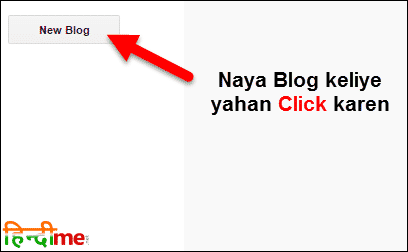
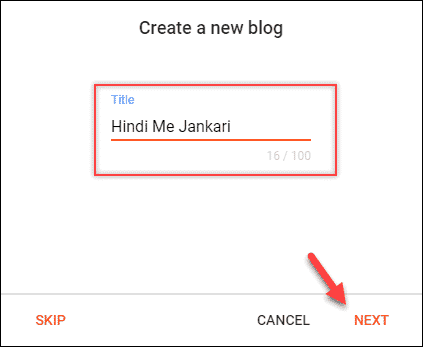
4 . Youmust enter the" Title "of your blog. This is going to be the name of your blog. Thenclick on Next .
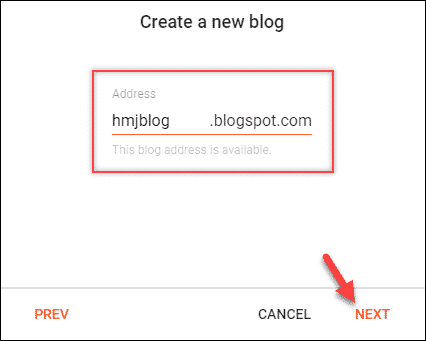
5 . In the next step you " Addressmust be unique, which would give". If your name is unique then it will tell you, " This blog address is available ". Thenclick on Next .
6 . In the next screen you have togiveyour " Display name ", which is your profile name. Then click on "Finish ".
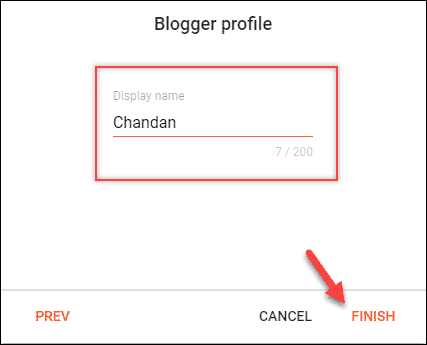
Now your blog is ready. Address Fieldwill be your whatever name, they address your Blog, Jaise HTUblogkblogspotkcom K Free blog always comes with a sub-domain and that is .blogspot.com . See, making a blog is very easy.
How to make a free blog on wordpress
Creating a blog in WordPress is as easy as Blogger. So let's start.
1) Go to www.wordpress.com website in your computer .
2) There you will get 2 options, one is for website and the other is for blog . There is no difference between the two, just gives you the opportunity to choose different themes according to the website and blog. You select any option.

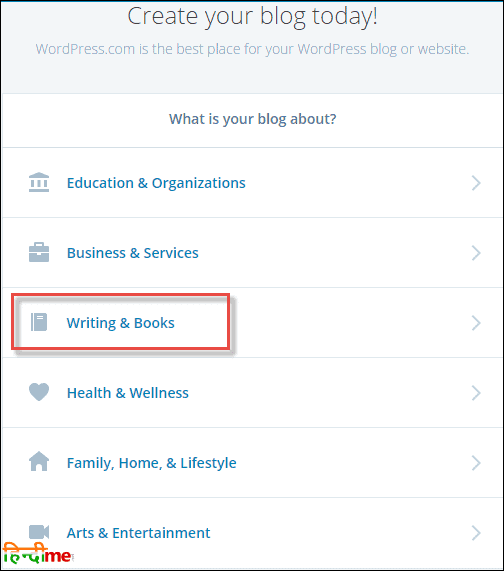
3) I selected " Blog " and in the next page it asks you the category of your blog . I selected " Writing & Books " here .
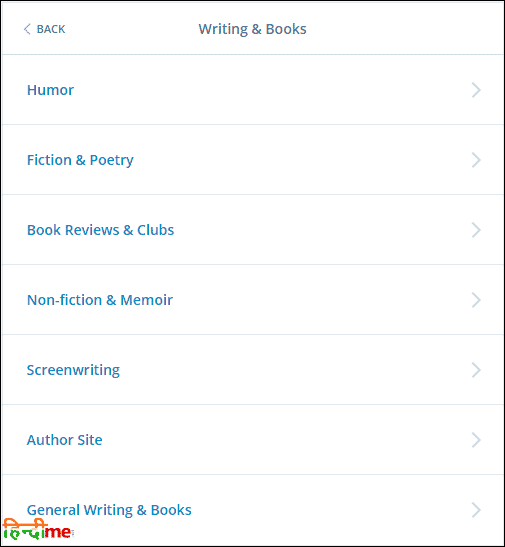
4) In the next page, a sub-category of your category will be shown. You select any one.
5) Then you have to select a theme, which will be the design of your blog.
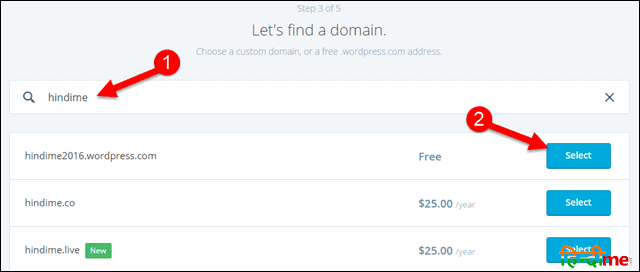
6) In the next page, you have to select a domain name for your WordPress blog , which is unique. Then you have to click in the option of " Free ".
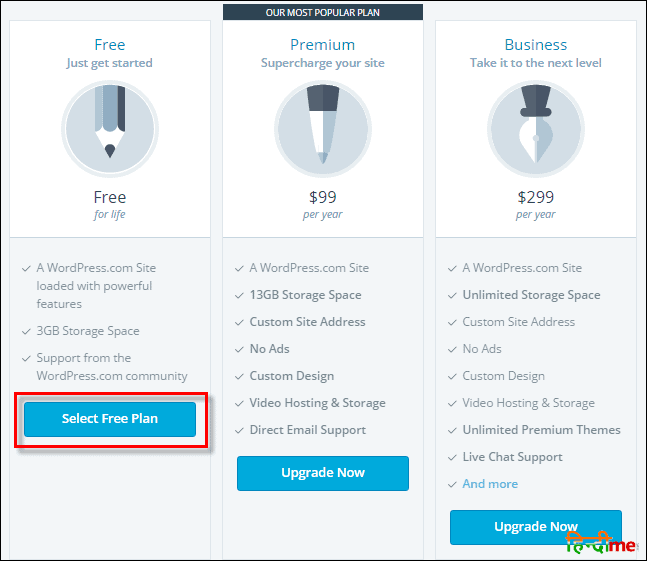
7) In the Plans page, select the option of " Free ".
8) Now you have to create your account. Here you just have to enter your email id and password and click on " Create My Account " button.
Now your wordpress blog is ready. Just once you have to open your email account and verify the email of wordpress. Comes with your website / blog .wordpress extension. Whenever you want to login to your account, you can do it through wordpress.com.
But there is a problem in this that you cannot customize it according to your mind. For that you have to use self-hosted WordPress. For that you will need to have a domain and hosting . Once you buy both of these, you will be able to know the process of installing WordPress by clicking here .
You are seeing all the big blogs and news sites on the internet, almost all of them have been made on this platform. If you just want to learn how to run it, then free one is fine for you.
How to write a blog
You will see the symbol of a (+) below Blogger blog and you can write a blog by going to New → Post in WordPress . Here is a video below that how you can write an article in Blogger and WordPress which will rank in Google. Do see this and apply to your blog.
Hostgator India 50% Discount Coupon 2021
If you Hosting requires 50% Discount Offer to purchase then it will benefit you 50% Discount of which can be used the coupon. If you want to start your blog on WordPress, then this is a good opportunity for you.
How to start my own blog?
Hopefully you have understood how to create a blog . It is very easy. You just have to follow some simple steps. If you want any information related to this, you can ask me. I will try to help as much as possible. If you liked this article, then share it with your friends on how to start a blog and help them to create their own blog too.

10 Comments
Good information
ReplyDeleteHi Amit,
DeleteThank you for visit.
Give your number brother
ReplyDeleteWhat an excellent blog… I’ve been researching to see if starting a blog is something I want to get into.. I’m retired and do crafts for friends and family. But ,don’t want to be limited to just blogging about that area. I’m also an author (inspiration-Christian) and wanted to know if you can have sections when establishing a blog?
ReplyDeleteHi Gale,
DeleteYes, the easiest way to do this is to categorize each post. Your post will then automatically go to the correct category page on your blog.
Hi Jitendra, This is some great help! But I have a question….
ReplyDeleteIf I start a blog is it considered a “side gig”? Or do i have to register a “Business”?
How would I report my income?
Hi Cheryl,
DeleteYou can do it either way. Most people just start with it as a side hustle, and then as it grows you can consider setting up a business. It would be best to talk to a tax accountant once you get to that point though.
Thank you for all of this information. I’m motivated to start blogging. I am confident that things will go smoothly with all the info that you provided.
ReplyDeleteThank you Jitendra. I am so grateful for this enlightening information you have given to me here. I now know how to set up my own blog. But I have a question. Which method of payment does bluehost support when you are paying for the hosting service? And can you choose to pay monthly, or must it be paid yearly? Thanks once again. Please i am expecting your reply.
ReplyDeleteHi,
DeleteA one year package is the shortest option. BlueHost accepts credit cards or PayPal.
Feel free to contact me if you have any trouble getting started